


Baby Panda's Sweet Shop
4.234.00 Reviews
App Specs
- Version
- 8.76.04.32
- Updated On
- License
- Free
- Downloads
- 10,000,000+
- Developer
- BabyBus
- Categories
- Educational
- Platform
- Android, iOS
Screenshots

 Analysis by AppCompare
I see Baby Panda's Sweet Shop as a useful shared-device game for short stretches when a young child wants to make something on screen and an adult needs to stay nearby without directing every tap. Its candy-shop theme gives the play a clear purpose, while the simple actions make it approachable for children who are still learning how to use a phone or tablet. I would treat it as a supervised activity, not as a way to occupy a child indefinitely: the best moments are when a grown-up can let the child choose, try, and explain what they are making.
A small play session that can fit family life
A realistic use is a quiet moment at home while dinner is being prepared or during a short wait before leaving. I can imagine handing over a shared tablet, inviting a child to choose a sweet-making activity, then asking them to talk through what they are doing. That turns the game into a little conversation rather than silent screen time. It also gives the adult a natural point to end the session: finish the current activity, describe the result, and return the device together.
That kind of routine matters more than trying to turn every tap into a lesson. The game’s making and decorating activities can prompt children to notice order, choices, and visual details, but I would not expect it to replace hands-on play with real ingredients, drawing, or pretend shop games. For a child who enjoys repeating a familiar activity, the app can be a handy change of pace; for a child who wants to run around or build with physical toys, a screen-based shop may not hold attention for long.
Shared-device boundaries are worth setting first
Because this is likely to be used on a family device, I would decide in advance which adult is responsible for handing it over and taking it back. I would also keep the child’s session within whatever device rules the household already uses, rather than assuming the game itself will manage time or separate one child’s activity from another’s. If siblings take turns, agreeing whose turn comes next before opening the game can prevent the familiar argument over who gets to choose the next treat.
One practical tip is to sit with the child for the first few minutes and watch how they move between activities. That gives you a chance to see whether the controls make sense to them and whether they need help stopping at a natural point. On a device shared with adults, I would make sure the child knows the difference between playing the game and leaving it to use other apps. This is simple household housekeeping, not a feature I would expect the game to provide.
What kind of learning it supports
BabyBus makes this educational game for children, and its appeal is strongest when a child likes imaginative role-play and colorful, guided activities. The shop setting gives the mini-games a thread: making a treat, adding decoration, and preparing it for sale feel like parts of one pretend job. That can encourage a child to follow a sequence and make small choices, though I see it as informal learning through play rather than a structured lesson or a substitute for a preschool activity.
The game is rated for Everyone, which makes it broadly suitable in age terms, but that label does not tell a parent whether a particular child will enjoy it or how long they should play. I would use a young child’s patience and confidence with touch controls as the real guide. An older child looking for complex strategy, open-ended construction, or detailed cooking techniques may find the experience too simple. If your child is drawn to make-believe shops and sweet designs, though, that simplicity can be a strength rather than a flaw.
Worth Reading Before You Choose

Switching to Android Auto Means Rethinking Your Driving Routine

Google Calendar Makes a Crowded Week Easier to Manage

Baby Panda World Brings Quick Play to Modern Phones, but Its Game Library Feels Busy

ESPN’s Live Game View Makes Following Close Games Easier

QuizzLand Review: A Good Fit for Short Trivia Breaks, Not Every Player

Basketball Stars: Multiplayer Is Fast, but Can It Recover When Matches Go Wrong?
Compared with a basic coloring app, this has more of a pretend-play loop: the child is not only filling an image but moving through a shop-themed activity. Compared with a more open-ended building game, it offers less freedom to invent from scratch, but the guided steps can make it easier for a younger player to get started without adult instruction. I would choose it when a child wants a cheerful, structured activity, and choose drawing materials or a sandbox-style game when the goal is more independent invention.
On the practical side, it is free to download, while optional in-app purchases are listed at $2.49 per item. I would check the purchase settings on the device before handing it over, especially if a child is likely to explore buttons without knowing what they do. The game has an average rating of 4.0 from around 5,400 ratings and has been installed over 10 million times, which suggests it has reached many families, but popularity is not a guarantee that it will suit every child. It was released on June 8, 2022, and its current version is 8.73.00.30, with Android 6.0 as the minimum operating system.
Exploring the Sweet Wonderland
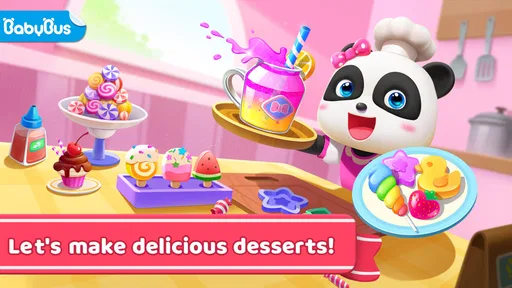
So, what's the deal with Baby Panda's Sweet Shop? Well, it’s all about creativity and exploration. Kids get to dive into the world of candy-making, where they can whip up everything from lollipops to chocolate treats. The app is designed to stimulate creativity and imagination, offering a hands-on experience that's both fun and educational.
The interface is super intuitive. Even if you're not tech-savvy, you'll find it easy to navigate. The developers have done a fantastic job ensuring that kids can easily find their way around without getting frustrated. The animations are smooth, and the sound effects add an extra layer of excitement to the whole experience.
Sweet Features to Savor
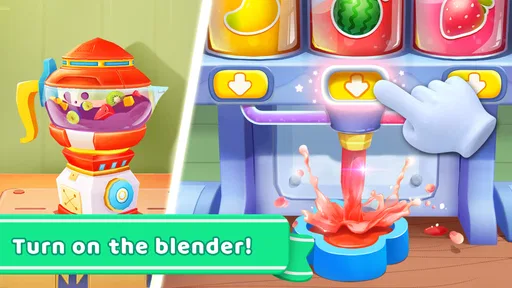
One of the coolest things about this app is the range of activities it offers. Kids can choose from a variety of sweets to make, and each comes with its own set of steps and challenges. This not only teaches them about the process involved in making these treats but also helps develop their problem-solving skills.
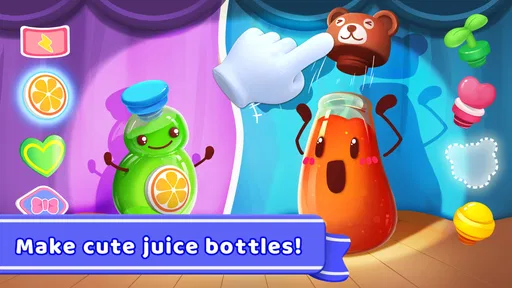
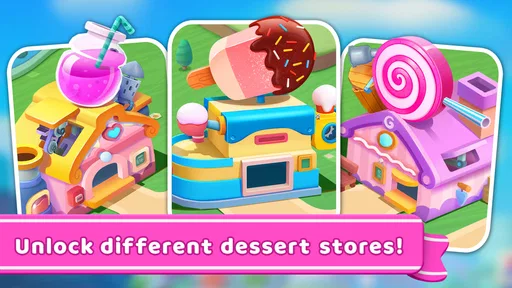
The app includes a delightful mix of mini-games that keep things interesting. From decorating your candies to packaging them up for sale, there's always something new to do. Plus, the rewards system is a great motivator for kids to keep playing and exploring.
Why Kids Love It
Honestly, the app is just downright adorable. The characters are cute, the graphics are colorful, and the music is catchy. It's the kind of app that makes learning feel like play, which is exactly what you want in an educational game for children.
Parents will appreciate that the app is free from ads, ensuring a safe and uninterrupted experience for their little ones. It also supports multiple languages, making it accessible to kids from different backgrounds.
In a world where screen time can often be a point of contention, it's refreshing to find an app that's both entertaining and enriching. Kids are not just staring at a screen; they’re actively engaging with it.
Final Thoughts
In conclusion, Baby Panda's Sweet Shop is a delightful addition to any child's app collection. It combines fun, learning, and creativity in a way that feels effortless and enjoyable. Whether your kid is a budding chef or just loves sweets, they’re bound to find something to love here.
If you haven't downloaded it yet, give it a try. It's a sweet treat that you won't regret indulging in!
Making the game work for different children
For a child who likes to choose colors, decorate objects, and see a pretend task reach a clear finish, this game has an easy entry point. I would introduce it by asking the child to pick one activity rather than listing everything they could do. That keeps the first session manageable and lets them discover the sequence at their own pace. If they want to replay a familiar part instead of trying every option, I would let that happen; repetition is often more comfortable than constant novelty for a young player.
It is less suitable for a child who expects a realistic cooking simulator or a game with extensive freedom to design a shop. The candy-making theme is a playful frame, not practical instruction for preparing food. When the child asks how a real popsicle or juice is made, I would use the question as a bridge to an adult-led kitchen activity rather than treating the on-screen actions as a recipe. That distinction keeps the game enjoyable without overstating its educational role.
Keeping turns calm and predictable
On a shared phone, the screen is smaller and adult notifications or other apps can interrupt the child’s attention. A tablet may be more comfortable for a child who is still developing precise touch control, but I would still keep the device in a place where an adult can see what is happening. If several children want to play, taking turns choosing an activity can work better than letting the first player control the whole session. A simple verbal rule—one choice each, then swap—gives everyone a clear part without requiring a special family feature.
For a child who becomes reluctant to stop, I would set the endpoint before starting: one activity, or a short visit until the current treat is finished. The game’s sequence of making, decorating, and packaging can offer a natural stopping cue, but a reward or completed item should not be treated as an obligation to continue. I find that naming the endpoint calmly at the start is more useful than negotiating after a child is absorbed in the screen.
Purchases, accounts, and adult oversight
The optional purchases are the main point I would check before a child uses the game alone. Since the game costs nothing to download but offers items for purchase, I would review the device’s purchase protections and make sure the child understands that tapping around does not mean they are allowed to buy something. I would not assume that an adult account, a child profile, or a household setting is built into the game; the safer approach is to use the controls already available on the device and keep payment decisions with the adult.
That also helps when a device is used by both a child and a parent. I would open the game for the child, confirm they can find the activity they want, and avoid leaving them to navigate back through the adult’s apps afterward. This is especially useful for younger children who may not distinguish a game screen from the device’s wider interface. The game can provide the play activity, while the household supplies the boundaries around access and purchases.
What the popularity figures do—and do not—tell me
BabyBus is the developer, and the game’s broad reach makes it a familiar kind of choice for families browsing educational play. Still, I would treat its 4.0 average as one clue, not a personal recommendation tailored to my child. A child who enjoys cheerful characters and step-by-step pretend tasks may respond warmly; another who prefers quieter visuals or less guided play may not. A quick supervised first session will tell you more than a rating alone.
The Everyone age classification is reassuring as a broad content signal, but it is not a substitute for parental judgement about attention, device access, or spending. I would also distinguish between a game being easy to understand and being appropriate for unsupervised use: those are different questions. For a younger child, a nearby adult can help interpret the activity, manage turn-taking, and step in if the child leaves the game accidentally.
When I would choose something else
If the goal is to practice letters, counting, or a specific school skill, I would choose an app built around that direct learning objective. If the goal is open-ended artistic expression, paper, crayons, or a drawing app may give a child more room to invent without following a shop sequence. This game sits between those alternatives: its appeal is a guided make-believe task with visual rewards, rather than a formal lesson or a blank canvas.
I would also skip it for a child who is already frustrated by touchscreens, dislikes bright character-led games, or is being asked to settle down when what they really need is movement and company. In those situations, an adult-led story, a physical pretend shop, or a break from screens is likely to be a better fit. The app is most useful when its particular theme matches the child’s mood, not simply because a device is available.
My household verdict
For a family looking for a free, child-friendly game that can fill a short shared-device session, I think this is an appealing option, especially for children who like sweets, pretend shops, and guided mini-games. I would pair it with clear turn-taking and adult-managed purchase settings, and I would keep expectations focused on imaginative play rather than deep instruction. Those small choices make it easier to enjoy the game without letting it take over the household routine.
My recommendation is selective but positive: try it with the child who enjoys colorful, step-by-step creative play, then judge by their attention and mood rather than by how many activities they complete. If they engage happily and can stop when the agreed session ends, it can earn a place among your family’s occasional screen-time choices. If it leads to friction or fails to hold their interest, there is no need to push it; a different kind of play will serve them better.
Pros
- Engaging graphics for young children.
- Wide variety of interactive mini-games.
- Educational content promotes learning.
- Simple interface easy for kids to use.
- No in-app purchases required.
Cons
- Limited content may reduce replay value.
- Background music can become repetitive.
- Requires internet for some features.
- Ads can interrupt gameplay.
- Older kids might find it too basic.
FAQs for Baby Panda's Sweet Shop
What is the main objective of Baby Panda's Sweet Shop?
Baby Panda's Sweet Shop is an interactive game designed for children to explore their creativity and learn about managing a sweet shop. The main objective is to allow kids to create a variety of sweet treats, like candies and ice creams, while learning about colors, shapes, and basic math skills in a fun, engaging way.
Is Baby Panda's Sweet Shop safe for children to use?
Yes, Baby Panda's Sweet Shop is designed with child safety in mind. The app contains no inappropriate content and offers a safe environment for kids to play. It encourages educational activities and is free from harmful ads, ensuring a secure and enjoyable experience for young users.
Does Baby Panda's Sweet Shop require an internet connection?
Baby Panda's Sweet Shop can be played offline, making it convenient for on-the-go entertainment without the need for Wi-Fi or mobile data. However, some features, such as updates or additional content, might require an internet connection to download.
What age group is Baby Panda's Sweet Shop suitable for?
The app is primarily designed for children aged 3 to 6 years. It offers simple navigation and interactive elements that are tailored to young users, helping them develop cognitive and motor skills in an age-appropriate manner. Parents can also engage with their children during gameplay for a shared learning experience.
Are there in-app purchases in Baby Panda's Sweet Shop?
While Baby Panda's Sweet Shop is free to download, it does offer optional in-app purchases. These purchases can enhance gameplay by unlocking additional features or content. Parents should monitor and manage these options to ensure they align with their preferences and budget.


